
09009
카운터 앱 만들기 - UI 본문
vscode 터미널에 vite 설치
npm create vite@latest
src/components/Viewer.jsx 생성
Viewer.jsx
const Viewer = () => {
  return (
    <>
      <div>viewer</div>
    </>
  );
};

export default Viewer;
App.jsx
import Viewer from "./components/Viewer";

function App() {
  return (
    <>
      <Viewer />
    </>
  );
}

export default App;
Viewer.jsx
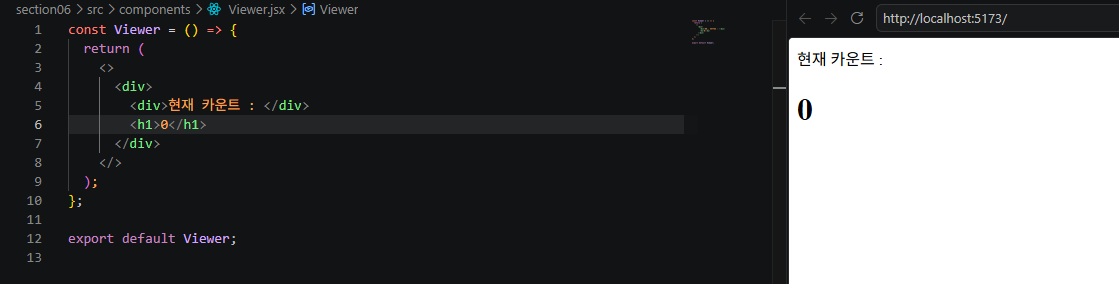
src/components/Controller.jsx 생성
Controller.jsx
const Controller = () => {
  return <div>controller</div>;
};

export default Controller;
App.jsx
import Controller from "./components/Controller";
import Viewer from "./components/Viewer";

function App() {
  return (
    <>
      <Viewer />
      <Controller />
    </>
  );
}

export default App;
Controller.jsx
const Controller = () => {
  return (
    <div>
      <button>-1</button>
      <button>-10</button>
      <button>-100</button>
      <button>+100</button>
      <button>+10</button>
      <button>+1</button>
    </div>
  );
};

export default Controller;
App.jsx
section 태그로 컴포넌트를 묶는 이유 : css로 스타일링 적용을 편하게 하기 위함
import Controller from "./components/Controller";
import Viewer from "./components/Viewer";

function App() {
  return (
    <>
      <h1>Simple Counter</h1>
      <section>
        <Viewer />
      </section>
      <section>
        <Controller />
      </section>
    </>
  );
}

export default App;
app 컴포넌트가 현재 렌더링하고 있는 요소들에 css에서 classname으로 접근할 수 있어야함.
-> 최상위 태그 div로 변경하여 classname 지정
import "./App.css";
import Controller from "./components/Controller";
import Viewer from "./components/Viewer";

function App() {
  return (
    <>
      <div className="App">
        <h1>Simple Counter</h1>
        <section>
          <Viewer />
        </section>
        <section>
          <Controller />
        </section>
      </div>
    </>
  );
}

export default App;
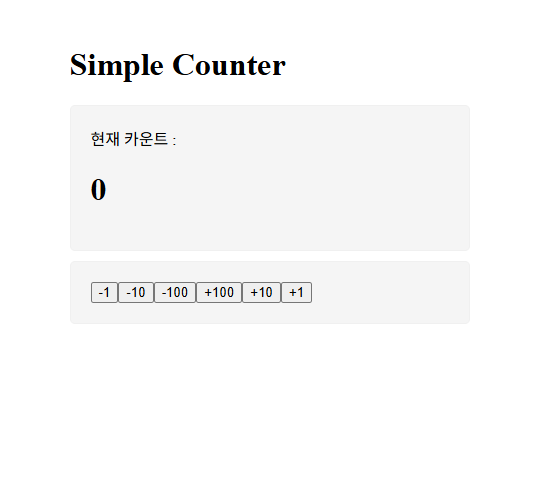
App.css
body {
  padding: 20px;
}

.App {
  margin: 0 auto; /* 화면 가운데 위치 */
  width: 400px;
}

.App > section {
  background-color: rgb(245, 245, 245);
  border: 1px solid rgb(240, 240, 240);
  border-radius: 5px;
  padding: 20px;
  margin-bottom: 10px;
}
'Front-End > React' 카테고리의 다른 글
| useEffect 사용하기 (0) | 2026.08.02 |
|---|---|
| 카운터 앱 만들기 - 기능 (0) | 2026.08.02 |
| state로 사용자 입력 관리하기 1 (0) | 2026.06.01 |
| State와 Props (0) | 2026.04.26 |
| state로 상태 관리하기 (0) | 2026.04.26 |
'Front-End/React' Related Articles
more

Comments